Common scams impersonating government

Scammers will often impersonate government agencies or officials to try and get money from residents and business owners. Common examples include:

  • Tax threats: A call or email claims you owe taxes and must pay immediately or be arrested.
  • Missed jury duty: You’re told you missed jury duty and must pay a fine or face jail time.
  • Grant or benefit offers: You’re told you’ve "won" a grant but must pay a fee or share your bank information.
  • Fake invoices: You receive a bill for a license, permit, poster, inspection, or other service you never ordered.
  • Phishing attachments: Official-looking emails with an "invoice" that contains malware.

Did you receive a suspicious request for payment or banking information? Check below for common signs of a scam.

Message from the offices of Financial Services (OFS) and Technology and Communications (OTC)

Invoice fraud is a serious and ongoing threat that can impact any organization — including the City of Saint Paul. We’re committed to helping residents stay informed and alert to prevent fraud from affecting our community.

We put together this guide for you to learn about common scam tactics and how to recognize the warning signs.
Invoice fraud example

Below is a real example of invoice fraud where the City of Saint Paul was able to step in and stop a resident’s money from being stolen.

What to Look Out For
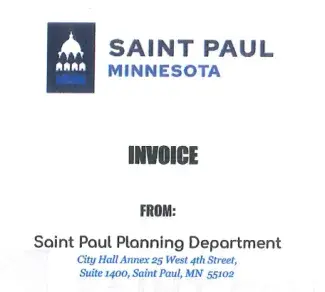
Screenshot of an invoice with the official Saint Paul logo. The logo is faded, and the text below is in a different font than is used on official city documents.
  • Faded or washed-out logo: If the Saint Paul logo looks light, blurry, or hard to see, it’s not real. Official City messages always use a clear and easy-to-see logo. Please note: Scammers now copy real logos. A logo alone doesn't prove something is real.
  • Wrong font: If words like “INVOICE,” “FROM,” or “Saint Paul Planning Department” look odd or use different fonts, it could be fake. The City of Saint Paul has specific brand guidelines that we use for our materials. If something looks unusual, please consult our media kit.
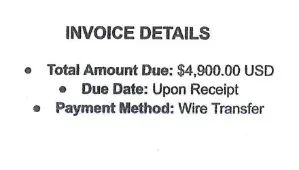
Screenshot of fraudulent invoice. Bullet points are misaligned. Text reads: "Total Amount Due: $4,900.00 USD. Due Date: Upon Receipt. Payment Method: Wire Transfer."
  • Strange formatting: If the bullet points or text are oddly placed, it might be fake.
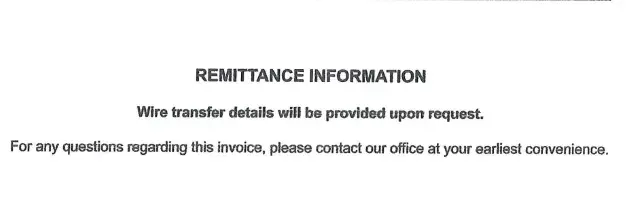
  • Wire transfer request: If someone asks you to send a wire transfer, it’s a scam. The City of Saint Paul will never ask for payment this way. 
Screenshot of fraudulent invoice. Text reads: "Remittance Information: Wire transfer details will be provided upon request. For any questions regarding this invoice, please contact our office at your earliest convenience."
  • Wire transfer request: See above.
  • No official City phone number: If there’s no phone number, or you’re not sure if the number is real, go to the City’s official website to check. Please note: If you're at all unsure, don't call the phone number.
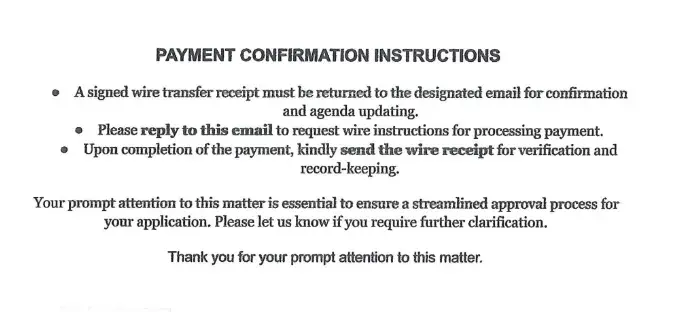
Screenshot of fraudulent invoice. The invoice asks recipient to reply to an email to request wire transfer instructions for payment processing. It requests prompt attention to this matter to ensure the recipient's application is approved.
  • Wire transfer request: See above.
  • Asked to reply to an email for payment information: Scammers may ask you to reply to an email to get payment instructions. The City will never do this and will never send payment information this way.
  • Pushy language: If the message says things like “respond promptly” or makes you feel rushed, that’s a red flag. The City won’t pressure you or use urgent words to get you to act quickly. 
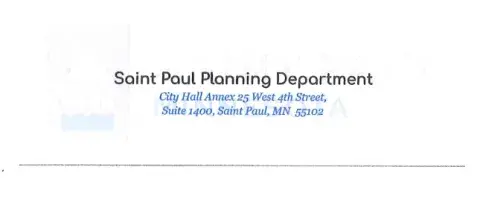
Screenshot of fraudulent invoice. City of Saint Paul watermark is faded to the point of being almost invisibile. Footer font does not match other official City documents.
  • Faded or hard to read watermark: If the background watermark looks very light, blurry, or copied over many times, that’s a warning sign. The City uses computer software to make invoices, so the text and watermark should always be clear and easy to read.
  • Wrong font: See above.

How to protect yourself

Watch out for common red flags

Scammers have become more sophisticated. However, there are red flags that can help you spot a scam. Keep an eye out for the following:

  • Urgent or pushy language: Fake invoices often say you must pay immediately or make you feel rushed. This is done to stop you from checking if the request is real. Slow down and take a minute to verify the request before taking action.
  • Unexpected bills: Scammers rely on people not paying attention to the details.  If you receive a bill that is for something you never scheduled or received, this is a red flag.
  • Misspelled email addresses: Look closely at email addresses. The only email domains that are sure signs the invoice is real are ci.stpaul.mn.us and stpaul.gov. Small errors (like “stpual.mn.us” instead of “stpaul.mn.us”) can be a sign of a scam.
  • Wrong payment method: The City will never ask you to send money through a wire transfer, gift card, or cryptocurrency. The City uses software that checks and approves payments before they go through, to help prevent fraud. This software makes sure electronic payments are real.
  • Use of Artificial Intelligence (AI): Scammers use AI to make emails and websites appear real.

Check if the website is real

Make sure you’re on the City’s official website. It should always start with: www.stpaul.gov/ or online.stpaul.gov/. Scammers might use fake addresses like “stpaulgov.com,” “stpaulg.ov,” or “saintpaulgov.org.” Always double-check the website address before clicking or entering any information.

In general, always look at the web address (URL) at the top of your screen. Official websites usually end in “.gov” for government. Watch out for small changes in the name, like extra letters or words. If something feels off, it’s better to double-check before clicking or sharing personal information.

Below are two tools trusted by the City of Saint Paul to verify a website:

Check if the email is real

There are lots of ways to make an email look valid. Check for these common warning signs before you trust any invoice or bill sent to your email:

  • Misspelled email addresses: Look closely at email addresses. The only email domain that is a sure sign the invoice is real is ci.stpaul.mn.us. Small errors (like “stpual.mn.us”) can be a sign of a scam.
  • Spelling or grammar mistakes: Real businesses usually check their emails carefully.
  • Links that don’t match: Hover over links (without clicking) to see where they really go. If the address looks suspicious, don’t click.
  • Attachments you weren’t expecting: These can contain viruses or malware. 

Call the City to verify your invoice or report fraud

Still unsure if the invoice you received is real? Call the City's customer service team at 651-266-8989 or fill out this form to report a concern. You can also use your invoice number to confirm with the City: online.stpaul.gov/stpaulportal/sfjsp?interviewID=pay-bill.  

Use the City's of Saint Paul Payment Center

To pay a bill online, please go to the City of Saint Paul Payment Center: stpaul.gov/payment-center.  

Directory for department invoices

Issue invoices

The following departments within the City of Saint Paul issue bills and invoices. If you've received a suspicious bill or invoice, you can contact the appropriate department directly to confirm whether or not it's real. 

  • Department of Safety and Inspections
    • Customer Service: 651-266-8989
  • Parks and Recreation
    • Customer Service: 651-266-6400
  • Public Works
  • Saint Paul Public Library
    • Customer Service: 651-266-7000
  • Saint Paul Regional Water Services
    • Customer Service: 651-266-6350

Don't issue invoices

The following departments do not issue bills or invoices. If you receive a bill or invoice with one of these departments listed, please contact the City of Saint Paul at 651-266-8989 or use the City's online form to report a concern. 

  • City Attorney’s Office
  • Department of Human Rights and Equal Economic Opportunity
  • Department of Planning and Economic Development
  • Emergency Management
  • Mayor’s Office
  • Office of Financial Empowerment
  • Office of Neighborhood Safety
  • Office of Human Resources
  • Office of Technology and Communications
  • Saint Paul City Council
  • Saint Paul Fire Department
  • Saint Paul Police Department 

Report fraud

There are many ways to report a fake invoice. If it's claiming to be from the City of Saint Paul, please fill out the form below to notify us. 

Report a concern to the City of Saint Paul

You can also report fake invoices to the following government offices:

Office of Minnesota Attorney General Keith Ellison 
445 Minnesota Street, Suite 600 
Saint Paul, MN 55101 
Phone: 651-296-3353 (Twin Cities Calling Area) 
800-657-3787 (Outside the Twin Cities) 
800-627-3529 (Minnesota Relay) 

United States Postal Inspection Service Criminal Investigations Service Center 
Attn: Mail Fraud 
1745 Stout Street
Suite 900 Denver, CO 80299
Phone: 877-876-2455

Federal Trade Commission Bureau of Consumer Protection 
600 Pennsylvania Avenue NW 
Washington, DC 20580 
Phone: 877-382-4357 
Teletypewriter: 866-653-4261

Better Business Bureau of Minnesota and North Dakota 
220 South River Ridge Circle 
Burnsville, MN 55337
Phone: 651-699-1111 or 800-646-6222

Questions? Call us about your invoice

Unsure about an invoice you received? Reach out to the City of Saint Paul's customer service team. They can direct your call to the appropriate department, so we can confirm whether or not your invoice is real. Call the City at 651-266-8989.